


Geo Tracker - GPS tracker
4.52.70K Reviews
App Specs
- Version
- 5.6.2
- Updated On
- License
- Free
- Downloads
- 10,000,000+
- Developer
- Ilya Bogdanovich
- Categories
- Travel & Local
- Platform
- Android, iOS
Screenshots
 Analysis by AppCompare
I first appreciated Geo Tracker’s kind of tracking on an ordinary outing: the useful part is not only seeing where I am, but being able to keep a record that makes sense after I get home. That distinction matters if you want to retrace a walk, compare routes, or show someone where a journey actually went. For a household sharing a device, it can also turn a family hike or drive into a route record everyone can look back at—provided the person carrying the phone is the one whose trip is being recorded.
A shared phone works best with clear expectations
Geo Tracker is a travel and local app from Ilya Bogdanovich, and I see its strongest shared-use role as a trip log rather than a family locator. One person can carry the phone, record a route, then share the resulting track with others. That is a practical arrangement for a group walk, a day out, or a road trip when not everyone needs to operate the app themselves.
There is an important difference between sharing a finished route and coordinating people live. A saved track can help the group understand where the outing went, but it should not replace an agreed meeting point, a charged phone, or a plan for what to do if someone gets separated. I would not treat a route recorder as a substitute for a dedicated location-sharing service when the main need is seeing where several people are right now.
Decide whose trip is being recorded
On a shared household phone, I would make a simple habit of checking who is using it before starting a recording. The track represents the phone’s journey, not a verified identity, so handing the device from one person to another can make the saved route confusing. A quick check before you press start and another when you finish is a small step that keeps the record useful.
That same boundary matters when sharing. A route can reveal more than a destination: it may show where a walk began, where someone paused, and which way they returned. I would review a track before sending it to a wider group, especially if it includes the start or end of a journey near home. Sharing selectively is more sensible than treating every outing as something that should automatically be public.
What the route record is good for
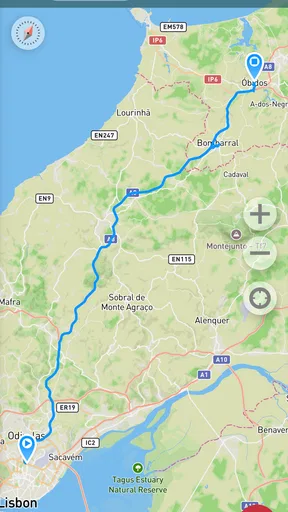
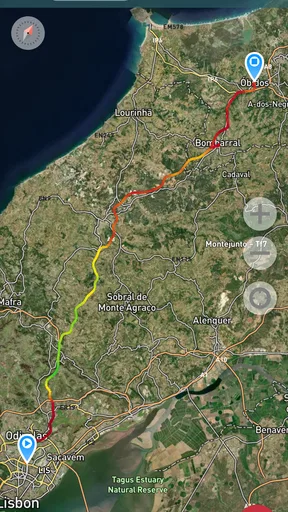
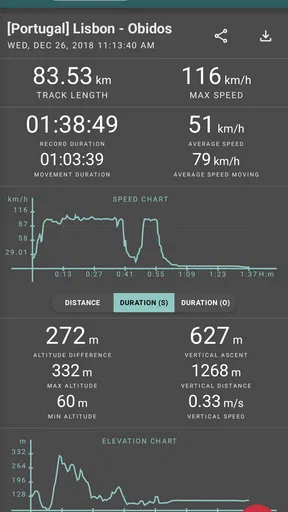
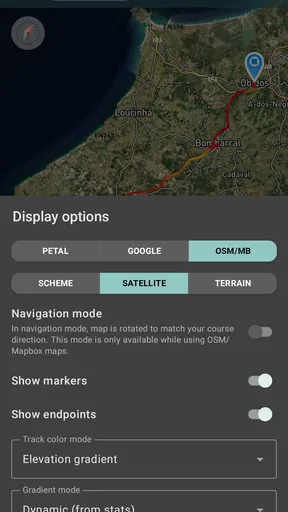
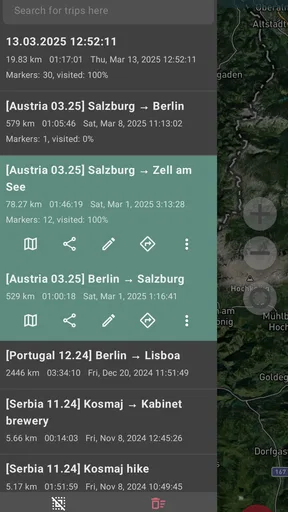
The app’s focus is straightforward: record GPS trips, inspect their statistics, and share them. In my view, that makes it a better fit for people who want a usable history of their own movement than for people looking for turn-by-turn directions or a live dashboard for a whole household. It can complement a map or a navigation app, but those tools answer different questions: navigation helps decide where to go next, while a recorded track helps you understand where you went.
Real-Time Tracking
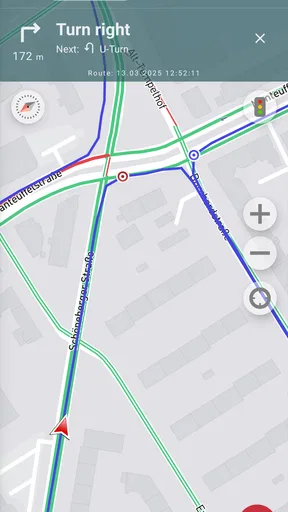
One of the standout features of Geo Tracker - GPS tracker is its real-time tracking capability. As someone who likes to wander off the beaten path, it’s reassuring to see my exact location at any given moment. Plus, the app logs your speed, distance, and altitude, giving you a comprehensive overview of your journey.
Worth Reading Before You Choose

Flipboard Shows What News Apps Must Do Beyond the Feed

Switching to Android Auto Means Rethinking Your Driving Routine

Google Calendar Makes a Crowded Week Easier to Manage

Ludo King Makes the Most of the Minutes Between Plans

Baby Panda World Brings Quick Play to Modern Phones, but Its Game Library Feels Busy

ESPN’s Live Game View Makes Following Close Games Easier
Sharing Your Adventures
If you’re like me and love sharing your adventures with friends and family, you’re in for a treat. The app allows you to export your tracks and share them via social media or email. Whether you’re documenting a cross-country road trip or a simple walk in the park, your friends can follow your journey in detail.
Offline Maps
One feature I found particularly useful was the offline maps. Let’s face it, connectivity isn’t always guaranteed when you’re out in the wild. Having access to offline maps ensured I was never truly lost, even when my phone signal was nowhere to be found.
For a trip beyond reliable reception, I would prepare before leaving rather than count on sorting everything out at the trailhead. Check that the map area you need is available offline, make sure the phone has enough charge, and start with a short test recording if you have not used the app in a while. GPS recording and map access are related but not identical needs: a route log may still be useful when mobile data is unavailable, while map detail depends on having the relevant offline material ready.
Customizable Waypoints
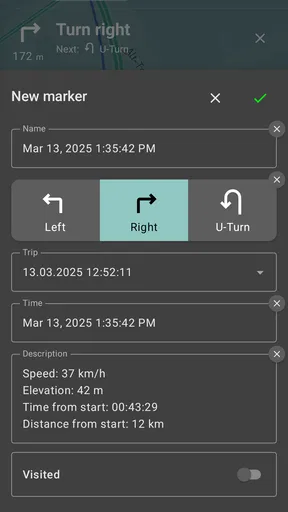
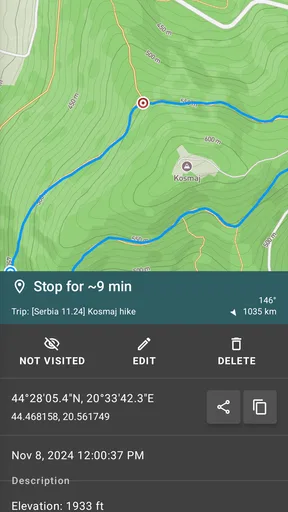
Ever wanted to mark a spot for a return visit? The app lets you drop waypoints along your route, making it easy to remember those hidden gems you stumble upon. It’s like leaving little digital breadcrumbs that you can revisit anytime.
Small habits that make a track more useful
Waypoints are especially valuable when a route has a few meaningful decision points rather than one obvious destination. I would mark a trail junction, a viewpoint, or the place where I turned back, instead of adding markers every few minutes. A small number of deliberate notes makes the saved route easier to read later and helps distinguish “where I went” from “what I want to remember.”
There is also a good reason to begin recording before the interesting part of an outing. If you start only after reaching a trail or scenic spot, the approach and return may be missing from the record. For a walk from a parking area, for example, starting at the beginning gives the exported track a clearer context. On the other hand, if you are using the phone for a short errand, recording every routine movement may create clutter rather than insight; I would save it for trips I expect to revisit or share.
Age, trust, and sensible use
The app is rated for Everyone, which makes it suitable for a broad audience, but I would still explain its purpose to a child before handing over a phone. It records movement, so the important conversation is about when to start, who can see a shared track, and when to stop. Those are good habits for any location-related tool, regardless of age rating.
For parents, the distinction between a trip record and ongoing supervision is worth being explicit about. Geo Tracker is most useful when the person carrying the phone knows a route is being recorded and agrees to share it. If your household needs continuous coordination or a guardian-focused location system, choose a tool designed for that job instead of expecting a GPS track log to provide controls it is not built around.
Where it fits among travel apps
Compared with the usual navigation apps, Geo Tracker is more about preserving a journey than guiding each turn. Compared with a fitness tracker, it is useful when the route itself matters, not only exercise summaries. And compared with messaging someone your live location, it offers a record that can be examined or shared after a trip. I like that narrower purpose; it keeps the app useful without asking it to replace every map, fitness, or communication tool on the phone.
The trade-off is that a focused tracker asks you to manage the recording yourself. You need to remember to begin and end a session, decide what to share, and make sensible preparations for areas with poor connectivity. Someone who wants spoken directions, automatic workout coaching, or effortless group coordination may be happier with a different category of app. For someone who wants to keep a route and inspect the journey later, the hands-on approach is reasonable.
Practical Uses
While Geo Tracker - GPS tracker is perfect for outdoor adventures, its utility extends beyond just hiking or cycling. It’s a fantastic tool for road trips, helping you keep track of your travels and discover new places along the way. I even used it to track my run, and it was fun to see my progress over time.
A realistic everyday use is a weekend walk with relatives in an unfamiliar park. I would let one person carry the phone, record the outing from the start, and mark a junction or picnic spot worth finding again. Once home, the group can look at the track together and decide which section to repeat next time. That is a modest benefit, but it is exactly the sort of use where a route history is more helpful than trying to remember every turn from conversation alone.
It also works for practical personal records: tracing a cycling loop to repeat later, keeping a record of a scenic drive, or checking how a familiar route changes when you take a detour. The strongest reason to use it is not to accumulate statistics for their own sake, but to make a journey easier to recall and share. If you rarely revisit routes and only need directions from one place to another, a standard map app may be simpler.
Keeping Safety in Check
Safety is a major bonus with this app. Being able to share your location in real-time can be a lifesaver if you’re venturing into remote areas. It adds a layer of security, knowing someone can find you if you ever get into a sticky situation.
I would still treat that benefit as one layer of preparation, not a guarantee of rescue. Before heading somewhere remote, tell someone your general plan and expected return, carry enough battery for the outing, and do not assume that sharing a track will work as a substitute for a proper emergency plan. For a household, agreeing in advance who will receive a route and when to check in is more useful than sending a track without context.
Who should choose it—and who should not
I would recommend Geo Tracker to hikers, cyclists, walkers, and road-trippers who like having a record they can inspect afterward. It is also a sensible shared-device option when one person is responsible for the phone and the group wants a route to keep. People who prefer a simple map without managing recordings may find it unnecessary, while anyone seeking family controls or constant multi-person tracking should look for a purpose-built alternative.
The app is free to install, with in-app purchases ranging from about two dollars to around forty-four dollars per item. Its average rating is 4.6 from roughly 105,000 ratings, and it has been installed over 10 million times. Those figures suggest a well-established audience, but they do not tell me whether its particular workflow suits you; the key question is whether you want to record routes, rather than just navigate them.
Setup and compatibility
Geo Tracker first appeared on January 11, 2013, and version 5.5.1.4624 supports Android 6.0 and later. I would check that your phone meets that requirement before planning to rely on it for a trip. The age rating is Everyone, and the app’s travel focus is easy to understand, but younger users still benefit from an adult explaining how route sharing works and why a saved track can reveal personal routines.
For first-time use, I would not wait until a long hike to learn the controls. Try recording a familiar short walk, inspect the saved route, and test sharing it with one trusted person. That lets you see whether the map and track are clear on your device and gives you a chance to establish a household routine without risking a confusing first attempt on a remote outing.
The Verdict
After putting the Geo Tracker - GPS tracker through its paces, I’m genuinely impressed. It’s user-friendly, packed with features, and perfect for anyone who loves exploring. Whether you’re a seasoned adventurer or just someone who wants to keep track of their daily commute, this app has something for everyone.
With its combination of real-time tracking, offline maps, and easy sharing options, it’s a versatile tool that enhances any journey. Give it a try, and you might find yourself wondering how you ever traveled without it!
My household verdict
For a family or group that shares a phone, I would use Geo Tracker as a deliberate trip recorder: one person carries it, everyone understands when tracking starts, and the route is shared only with the people who need it. That simple arrangement keeps the app’s strengths—recording, reviewing, and sharing a journey—at the center without confusing them with live family monitoring.
My recommendation is strongest for people who enjoy looking back at where they have been and want a practical route record for future outings. If you mainly need turn-by-turn guidance, automatic fitness analysis, or ongoing coordination between several people, another tool will fit better. For trips where remembering the route is part of the fun, this is a useful, approachable companion.
Pros
- Accurate location tracking for outdoor activities.
- Intuitive interface with easy navigation.
- Offline maps available for remote areas.
- Customizable waypoints and markers.
- Low battery consumption during use.
Cons
- Limited social sharing options.
- Ads can be intrusive at times.
- No real-time group tracking feature.
- Requires GPS signal for full functionality.
- Basic analytics and reporting tools.
FAQs for Geo Tracker - GPS tracker
What is Geo Tracker and how does it work?
Geo Tracker is a GPS tracking application designed to help users record their travel routes and track movements in real-time. By utilizing your device’s GPS, it logs your path on a map, allowing you to review and analyze your trips. It's ideal for activities like hiking, biking, or road trips.
Does Geo Tracker require an internet connection to function?
Geo Tracker primarily uses GPS signals, so it does not require an internet connection to track and record your routes. However, some features, such as map downloads and sharing routes online, might need an internet connection to function properly.
Is Geo Tracker available for both Android and iOS devices?
Geo Tracker is available for Android devices and can be downloaded from the Google Play Store. Unfortunately, it is not currently available for iOS devices. Users with iPhones might need to consider alternative GPS tracking apps compatible with iOS.
Can I share my recorded routes with others using Geo Tracker?
Yes, Geo Tracker allows you to share your recorded routes with others. You can export your tracks in various formats like GPX or KML and share them via email or social media. This feature is great for sharing your adventures with friends or collaborating with fellow travelers.
What are some of the advantages and potential drawbacks of using Geo Tracker?
Geo Tracker offers advantages such as precise GPS tracking, offline functionality, and route sharing. However, some drawbacks include its unavailability on iOS and potential battery drain due to continuous GPS usage. Users should weigh these factors based on their specific needs before downloading the app.


